Free resource
Restaurant opening and closing checklist
A free, printable checklist for opening and closing a restaurant. It covers the safety walk, front of house, kitchen and line, temperature readings, the starting and ending drawer count, the deposit, lock up and the handoff between shifts. It prints on four letter size pages, one set per day.
It is written for the shift leads and owners of independent restaurants: the person who unlocks the door in the morning, the person who sets the alarm at night, and the owner who wants to see in the morning what happened the night before.
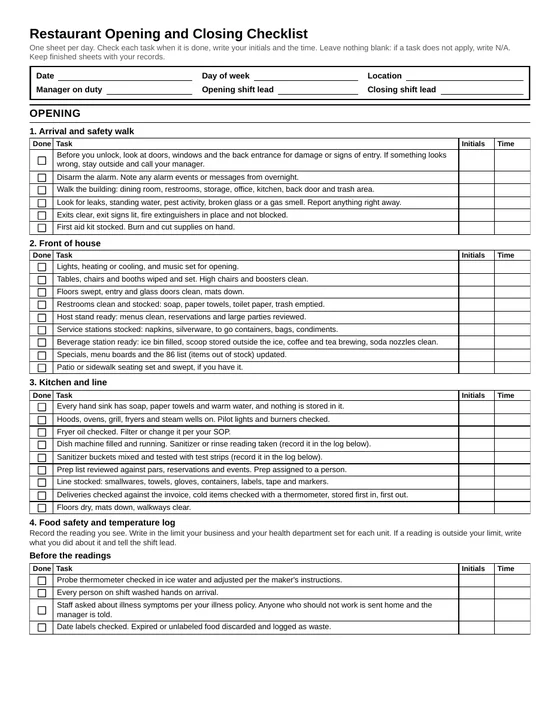
What is on the sheet
Opening
- Arrival and safety walk
- Front of house
- Kitchen and line
- Food safety and temperature log, with blank fields for each reading
- Cash: starting drawer count by denomination, with a drawer summary
- Systems check: POS, printers, card readers, online ordering, time clock, cameras
- Staffing and the handoff from the previous close
Mid shift handoff
A short section for when one lead hands the floor to another: second round of readings, cash drop, prep status, breaks, incidents and equipment problems.
Closing
- Kitchen breakdown and cleaning
- Food storage and labeling, with a cooling log and closing temperature log
- Front of house
- Cash: end drawer count, reconciliation, paid outs, deposit prep and a variance note
- Lock up and security, with a handoff table for the opener
Every task has a box to check, a space for initials and a space for the time.
How to use it on a real shift
Print one set per day. Keep a stack at the host stand or in the office. The header asks for the date, the location, the manager on duty and both shift leads, so a sheet never ends up unattached to a day.
Start with last night’s handoff. Before the opener does anything else, they read the closing note and the open items table from the night before. Anything still open goes into the “open items carried over” table with a name next to it.
Initial and time each task as you do it. Not at the end of the shift from memory. The time column is what makes the sheet useful later: it tells you when the walk in was checked, not just that someone checked it.
Write N/A instead of leaving a line blank. A blank line could mean skipped or not needed. N/A means someone looked and decided.
Use the mid shift section when leads change. If one lead works open to close, skip it. If the floor changes hands, the outgoing lead fills it in and both sign.
Close with a note for the opener. The last table on the sheet is the one the next person reads first. Write what is broken, what is low, what delivery is coming and who needs to follow up.
The manager reviews and signs. Both the opening and closing sections have a line for manager review. A sheet nobody reviews turns into a sheet nobody fills in.
How to adapt it
The sheet is a starting point. Cross out what does not apply, and write in what your location does that is missing. Then retype it so the next printing is clean.
Bar. Add bar setup to the opening: garnish prep, ice wells, glassware, the speed rail and keg or line checks. At close, add bottle and keg counts, wells emptied and cleaned, mats and drains, and how you secure liquor storage. If the bar runs its own drawer, use one of the drawer columns for it.
Café. Most of the kitchen section shrinks. Add espresso machine startup and grinder calibration to the opening, and backflush and steam wand cleaning to the close. Pastry and grab and go items need date labels like any other food.
Food truck. Add a vehicle walk around, generator or power hookup, propane, fresh and gray water levels and a check that the truck is secured for travel. The cash section usually needs one drawer, not three. Your commissary may have its own sign in and cleaning records; keep those with this sheet.
Multiple drawers or registers. The cash tables have three drawer columns. Add more columns, or use one sheet per register for the cash pages.
What to do with the temperature and cash records
Temperature readings. The sheet does not print any temperature limits. Write in the limit your business uses for each unit, based on your health department’s rules and your own food safety plan. When a reading is outside the limit, the “action” column is where the lead writes what they did: moved product, called for repair, discarded food, rechecked at a set time. Ask your local health department how long they expect you to keep these logs, and keep them at least that long. File them by date so you can pull a week quickly.
Cash records. Keep the cash pages with the POS reports for the same day. The variance note is the important part. A drawer that is short a small amount once is a counting question. A drawer that is short on the same weekday, or with the same person on the register, is a pattern worth looking into. The note gives you something to compare. If you use a bookkeeper or accountant, ask them which of these records they want to see and how long you should keep them.
Handoff notes. Read them as a set once a week. Items that show up on several closing notes in a row are the maintenance and staffing problems that need an owner’s attention.
FAQ
Is the checklist really free?
Yes. Download the PDF and print as many copies as you need. There is no email form.
Does this checklist meet health department requirements?
It is a general operations checklist, not a compliance document. Rules differ by state, county and city. Compare it with your health department’s requirements and your inspection reports, and add anything they ask for.
Why does the temperature log not list the correct temperatures?
Because the limits that apply to you depend on your health department, your equipment and your own food safety plan. The sheet leaves a “your limit” column so the person taking the reading can see the target next to the number they wrote.
Can I edit the checklist?
Yes. Change the tasks, rename the sections, add your logo and print it however you like.
How long should I keep the completed sheets?
That depends on your health department for the temperature logs and on your bookkeeper or accountant for the cash records. Ask both, and keep the sheets at least as long as the longer of the two answers.
Download
Four letter size pages. Free. No email needed.
Download the PDFWant a second set of eyes on your standards?
A checklist only helps when someone reviews it. If opening and closing routines slip between your visits, our site reviews observe the operation, document what we find and track the corrective actions you agree to. See Site reviews and operating standards.
Request an Operations Review